
Lee Taylor began his career on the floor of the New York Mercantile Exchange (NYMEX) before moving on to start an electricity broking desk for Exco/RJM. In 2012, Lee and James McManus started Cornerstone Futures. They focus on providing a unique, best-in-class brokerage to their customers and leverage the industry-leading tools available on the TT® platform for execution. Through their use of TT Order Types, Autospreader® and the third-party algo providers available on TT, they have successfully built a thriving brokerage. Follow Lee on Twitter at @Bosox1105 and learn about his market calls in gas spreads and other energy products.
Continue Reading →TT® Learning
Maximize your use of the TT platform with comprehensive yet easy-to-follow learning pathways.
Release Notes
Explore key releases enhancing trade execution and management.
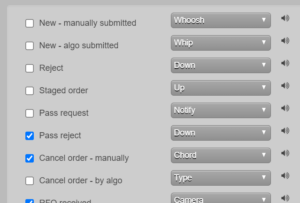
Settings- Sounds for Algo submitted/canceled orders
- Currently, the sounds for “New” and “Cancel” orders play for both manual orders and orders by automated tools. We have now separated the order actions between manual and algo to allow you to be notified when one or the other occurs. To implement this, the current two sound settings have been renamed to reference manual actions, and we have added two new sound settings for algo actions.
Settings- Increase number of custom action buttons
- You can now configure up to fifty (50) custom action buttons on the Order Ticket and MD Trader. Previously the limit was twenty (20) buttons per widget.
OMS Care order passing
- We have extended our current OMS order passing ability to now include the ability to pass staged orders.
Upcoming
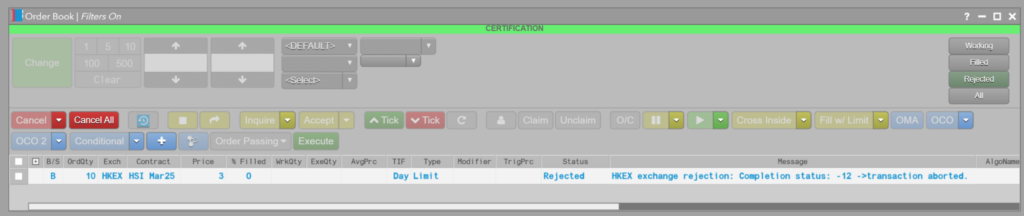
Order Book display Rejected orders for the current session
- The Order Book and Orders and Fills widget (OFW) now display rejected orders for the current session. A new “Message” column can optionally be exposed that displays the same reject message text displayed in the Audit Trail. The Message column supports filtering/searching on the message text string. A new quick filter button named “Rejected” displays in the top upper right portion of the Order Book, that when clicked applies a filter to only show rejected orders. Also as part of this work, in the Order Book Settings you can also customize the row color for rejected orders.
Display Settlement Date for NDFs and Spot FX
- We now display Settlement Date for NDFs and Spot FX in the appropriate grid widgets, e.g., OB, OFW, Fills, Audit Trail, etc.


